Modes
Floating icon popup + pop-out window
 Multi Agent Manager
AI work, finally under control
Across Claude, ChatGPT, Gemini, and Copilot — in your browser, on the desktop, and in your terminal. Know the moment a response is ready, share a chat with one click, and keep team projects in sync.
Modes
Floating icon popup + pop-out window
Status
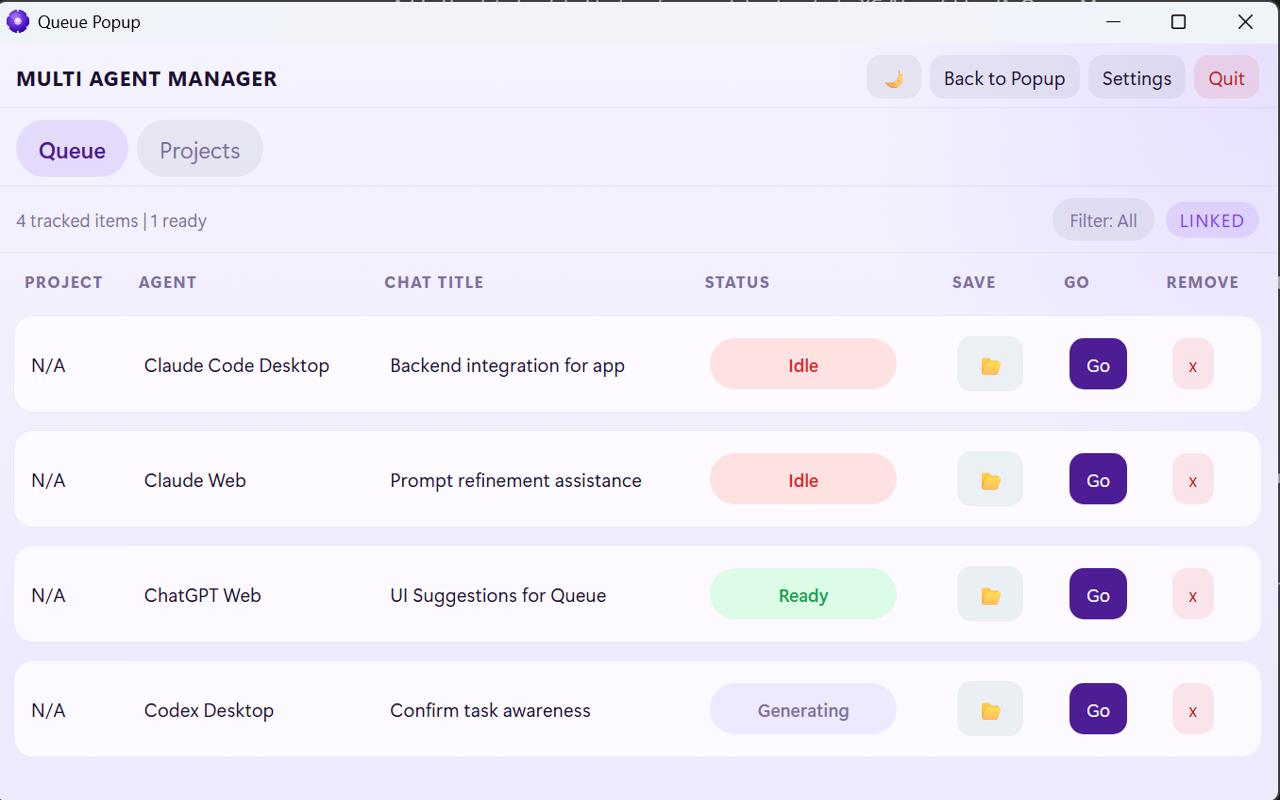
Ready, generating, waiting, idle
Return
Go jumps you back to the right place
How It Works
Multi Agent Manager watches every AI chat you have open — in the browser, on the desktop, and in your terminal — and gets you back the moment something is ready.
Download Multi Agent Manager for Windows, open it like any other desktop app, and let it set up the browser side for you after install.
Claude, ChatGPT, Gemini, and Copilot — in the browser, on the desktop, and in your terminal (Claude Code and Codex CLI). All in a single queue with the agent, project, and live status of each one.
Generating, ready, waiting, or idle on every row. The always-on-top floating icon shows a green badge for chats ready for you and an amber one for chats still working — pops the queue open with a click.
Hit Go and MAM brings the right Chrome tab, desktop window, or terminal to the front — even across multiple Chrome profiles and IDE windows.
Generate a public share link for any tracked Claude, ChatGPT, Copilot, or Gemini chat and have it copied to your clipboard. CLI sessions export to Markdown.
Group saved chats into Personal Projects on your machine, or invite teammates to Team Projects with role-based access and per-session visibility. Stays in sync in real time.