Modes
Floating icon popup + pop-out window
 Multi Agent Manager
AI work, finally under control
Across Claude Web, ChatGPT Web, Gemini Web, Claude Desktop, and Codex Desktop. Know the moment a response is ready. Built for people juggling AI work across browser tabs and desktop apps.
Modes
Floating icon popup + pop-out window
Status
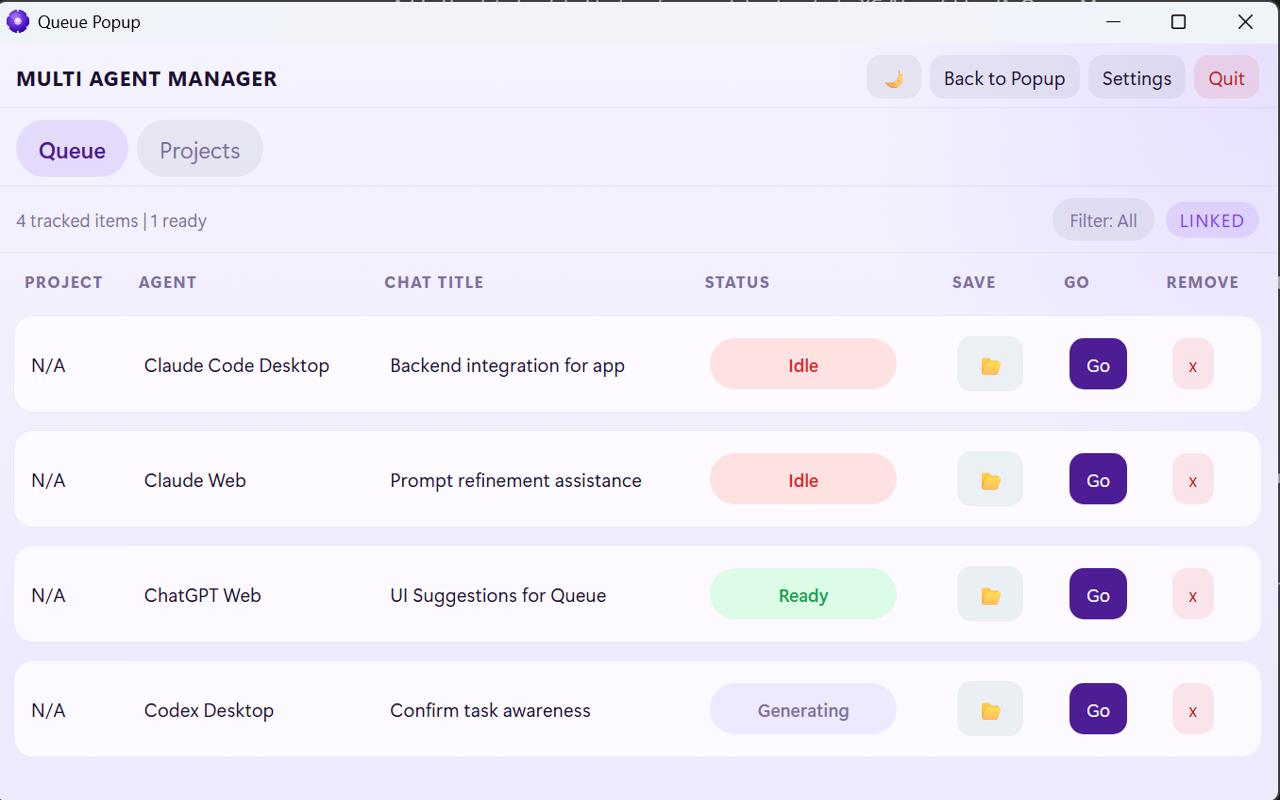
Ready, generating, waiting, idle
Return
Go jumps you back to the right place
How It Works
Multi Agent Manager watches your AI work across browser tabs, and desktop apps, then gets you back in the moment something is ready.
Download Multi Agent Manager for Windows, open it like any other desktop app, and let it set up the browser side for you after install.
Open your usual AI tools and the app starts tracking what is active, what is waiting, and what is ready across browser and desktop sessions.
The popup stays open and you can toggle it from the floating icon. Use the pop-out when you want a full-size window for the queue.
See which agent each session belongs to, what project it lives under, whether it is idle or generating, and which work is ready without hunting through tabs and windows.
When a response is ready and the session is active in your queue, hit Go to jump straight back to the right tab, pop-out, or desktop app.
Keep important work grouped by project, save sessions you want to come back to, and reopen the right context later from the Projects view instead of starting from scratch.